
How Often Should You Update Your Google Business Profile?
Google Maps favors businesses that maintain an active presence. If you complete your listing once and then leave it untouched for six months, its local search performance may suffer. A good maintenance routine includes responding to reviews within 24 hours, publishing fresh Google Updates every 7–10 days, adding new photos of your business and premises once a month, and checking special opening hours before every public holiday.
A common misconception among business owners is: "We've verified our location, entered the address, and uploaded photos. Now the listing will take care of itself." In reality, Google considers various signals when assessing a business profile, including the accuracy of its information and how customers interact with it. If you neglect your profile, you may miss important updates, while more engaged competitors may attract greater attention from potential customers.
However, making random changes every day is not a good strategy either. Frequent changes to your address or phone number can trigger additional scrutiny from Google's systems.
Update Frequency Matrix: What to Update, When, and How
| Profile section | Recommended frequency | What to do | SEO impact |
|---|---|---|---|
| Reviews and questions (Q&A) | Daily / within 24 hours | Respond to every review, naturally mentioning relevant services where appropriate, and answer users' questions. | Critical |
| Posts (Google Updates) | Every 7–10 days | Publish posts about promotions, new services, menu changes, or completed projects, with a relevant call to action. | High |
| Photos and videos | 1–2 times a month | Add 3–5 quality photos of your team, work processes, interior, or seasonal decorations. | High |
| Special opening hours | Before every public holiday | Confirm your regular or reduced hours for holidays such as Christmas, New Year's Day, and other public holidays. | High during relevant searches |
| Products and services | Once a quarter, or whenever changes occur | Update prices, remove discontinued items, and add seasonal offers. | Medium |
| Core information (business name, address, categories) | Only when actual changes occur | Keep core profile information accurate and stable. Change it only when necessary, such as after a relocation or rebranding. | Critical |
What If Nothing Changes in Your Business?
A common question is: "We run an established auto repair shop or notary office. Our prices and address are unchanged, and we have the same staff. What should we update?" It is important to keep your profile accurate and useful to people searching for your business. Here are three simple actions you can take:
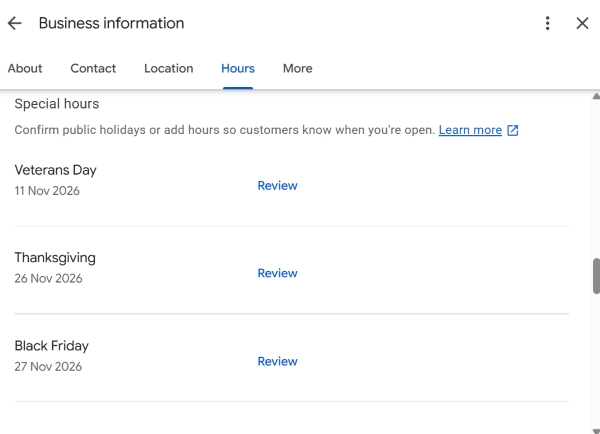
- Confirm your holiday opening hours. Even if you plan to follow your regular schedule during a holiday, open Edit profile → Hours → Special hours and confirm the schedule if the option is available. This helps customers see accurate opening hours and may remove Google's notice that hours could differ.
- Upload genuine photos from your everyday operations. Take photos of your clean reception area, new equipment, or the parking area by the entrance. Adding two or three recent photos each month can help keep your profile current and informative.
- Publish short case studies in Google Updates. Write two paragraphs about a typical job or completed project. For example: "This week, we completed a complex suspension repair on... / We helped a client complete a transaction involving... You can book a consultation using the button below."
Important - Do not change your primary business category just to experiment. Changing the primary category can affect which searches your business is eligible to appear in. Following such a change, your listing's visibility may fluctuate while Google processes the updated information.
A Typical Monthly Schedule for Managing Your Profile
Introduce this simple schedule for your marketing specialist or business administrator:
- Every Monday (10 minutes) -
- Check for new reviews and respond to them, mentioning relevant services where appropriate.
- Check the "Questions & Answers" (Q&A) section and provide official answers to customers.
- Review any Google-suggested updates or changes to your profile and reject incorrect or unauthorized suggestions where possible.
- Every 10 days (15 minutes) -
- Publish one new post using the Add update button. This could be a weekly promotion, an expert tip, or a business announcement.
- On the first day of every month (20 minutes) -
- Upload 3–5 new photos to your gallery.
- Review your statistics in the Performance section, including trends in calls and direction requests.
- Check your special opening hours for public holidays occurring during the month.
Audit Your Profile's Freshness
Frequently Asked Questions
What happens if I don't access my Google Business Profile for several months?
Neglecting your profile means you may miss important changes, customer questions, and opportunities to keep your information accurate. However, Google does not automatically lower a listing's ranking simply because its owner has not signed in for a while. Local rankings depend on several factors, including relevance, distance, and prominence. It is also worth checking your profile regularly for suggested edits and requests to verify your information.
Should I change my business categories frequently to reach more customers?
No. Do not change your primary category unless it no longer accurately describes your business. An unnecessary change can affect the searches for which your business is relevant and may lead Google to request additional verification. You can review your additional categories when your business genuinely introduces new services or seasonal offerings.
- Maintaining your Google Maps business profile can take as little as 15 minutes a week, helping you keep your information accurate and your listing useful to potential customers.
- Focus on timely review responses, regular posts, and fresh photos each month.
- Keep core information, including your business name, category, and address, accurate and consistent to reduce the risk of unnecessary verification issues.
Struggling to keep your Google Maps profiles updated across multiple business locations?
Leave a comment describing your situation. We'll review your current profile and help you create a content update plan tailored to your industry.