
How to Analyze Competitors on Google Maps
To outrank competitors in the top-3 Local Pack, you don't need to guess or copy everything they do. All you need is a structured audit of the leading local listings across five parameters: primary and hidden categories, review volume and semantics, product catalog presentation, posting activity, and the authority of the linked website. Below is a step-by-step competitive intelligence strategy.
When a new coffee shop, dental clinic, or auto repair shop joins Google Maps, it faces competitors that have spent years accumulating reviews and improving their rankings. Trying to overtake them head-on by artificially inflating ratings can quickly lead to algorithmic penalties.
An effective strategy starts with reverse engineering: we identify the strengths and weaknesses of the top three businesses in your area and capture their high-intent traffic by optimizing your profile more precisely.
Competitive Analysis Matrix for Top-Ranking Businesses
Choose three businesses that consistently appear in the Local Pack for your main search queries ("phone repair near me," "pizza restaurant downtown") and consolidate their characteristics into a single comparison table -
| Profile Parameter | What to Analyze | Where to Find Growth Opportunities |
|---|---|---|
| Primary and Additional Categories | The exact primary category in the profile and its secondary categories | If the leading competitor chose a broad category, consider using a more specific one |
| Review Profile | Total review count, rating, monthly growth rate, and keywords in review text | Read their 1- and 2-star reviews. They reveal customer pain points you can use to develop your unique selling proposition (USP) |
| Products and Services Catalog | Whether the "Products" section is available, price accuracy, and photo quality | About 70% of competitors leave this section empty. Build a complete catalog and attract clicks with better visuals |
| Photo Content | Number of owner-uploaded photos, interior images, signage, and team photos | Upload professional photos of your storefront and a video showing the route from the nearest transit stop |
| Website Landing Page | Loading speed, Schema.org structured data, and NAP consistency | Make your location's mobile landing page faster and easier to use than your competitor's |
5 Steps to Competitive Intelligence on Google Maps
Step 1. Determine Your Actual Visibility Radius (Geogrid)
When you search for your own business while sitting in your office, Google may rank it first because of the proximity factor (Distance). But the results could be completely different just 500 meters away.
- Check search results in an incognito browser window with precise location sharing disabled.
- For a professional assessment, use geogrid rank trackers such as PlePer or Local Falcon. They show your listing's rankings at intervals of 200–500 meters across the surrounding area in a heatmap.
Step 2. Reveal Competitors' Hidden Categories
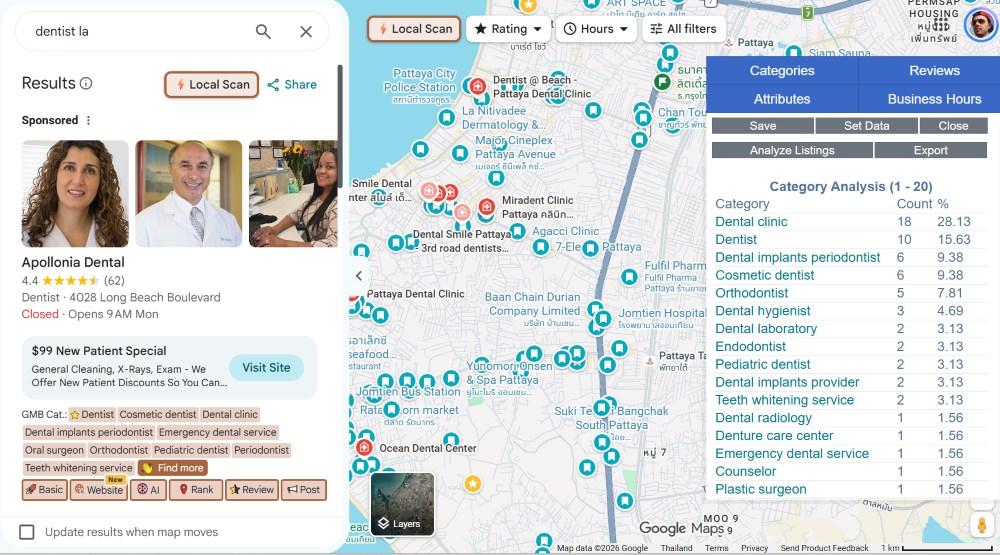
Only the primary category is visible in a standard Google Maps listing. However, Google Business Profile allows businesses to add up to nine additional categories, which can significantly improve visibility for related services.
Here's how to find them:
- Install a free Google Chrome extension, such as GMB Everywhere or PlePer Local SEO.
- Open any competitor's listing on Google Maps.
- The extension will display all categories, the business's creation date, and how frequently it publishes posts.
Step 3. Analyze Review Tags and Semantics
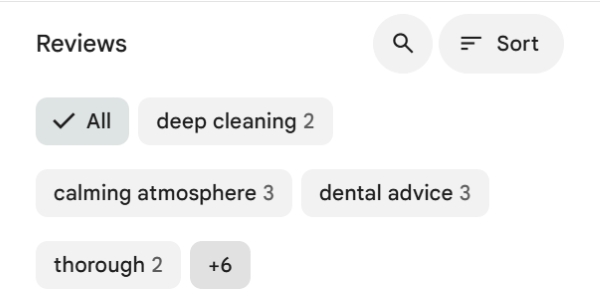
Open a competitor's reviews section. Pay attention to the keyword bubbles displayed near the top (for example, cleanliness, parking, prices, staff). These are algorithmically generated Google review topics. If a competitor has tags such as "expensive" or "long wait," you can emphasize your fixed pricing and appointment-only service in your own business description.
Step 4. Identify Policy Violations (Spam Fighting)
Some businesses maintain their top-three positions by adding keywords to their business names, such as "Dent Dental Clinic Moscow Affordable Teeth Treatment". If their actual storefront signage and official documents simply say "Dent," this business name violates Google's guidelines.
- Take a photo of the competitor's actual business signage.
- Click Suggest an edit directly in the listing and suggest the actual brand name, or submit a complaint through the official Business Redressal Complaint Form. Once the spam is removed, search rankings can be redistributed more fairly.
Step 5. Evaluate the Landing Page
Click the "Website" button in the leading competitor's profile. Check the following:
- Where does the link lead: the homepage or a page dedicated to that specific location?
- Do the phone number and address on the website match the information in the business profile (NAP)?
- Does the page include a reviews section and directions to the location?
Important - Don't blindly copy your competitors' categories or profile structure. A large clinic chain may be able to maintain its position despite poor optimization because of substantial branded traffic and website backlinks. Smaller businesses need to compete through detailed service information, fresh photos, and reviews containing relevant keywords.
Frequently Asked Questions
How can I see actual Google Maps search results in another neighborhood or city without location-based distortion?
For a cleaner search, open an incognito browser window and manually move the Google Maps view to the desired neighborhood. Alternatively, use specialized geogrid tools such as Local Falcon or PlePer, which simulate searches from multiple coordinates across a grid.
How can I find out which additional categories a competitor has hidden in their profile?
Google Maps publicly displays only the primary category. You can discover additional categories using free browser extensions such as GMB Everywhere and PlePer Local SEO, or by inspecting the HTML source code of the business's Google Maps listing.
- Success on Google Maps depends on clear, measurable factors: appropriate categories, relevant reviews, website speed, and accurate business information.
- Use browser extensions to analyze competitors' hidden categories and identify niche search queries they have overlooked.
- Study competitors' negative reviews to offer better service and address customer concerns before their first visit.
Want to find out why your competitors rank higher on Google Maps?
Share a link to your business and the address of your main competitor in the comments. We'll analyze the key differences and suggest opportunities for quick improvements.