
How to Contact Google Business Profile Support - All Contact Methods and Solutions to Common Issues
Google Business Profile does not have a dedicated telephone hotline. You can contact the support team only through the official Help Center form, Contact Us. To prevent your support ticket from being closed with an automated response, prepare your listing's Business Profile ID in advance, describe the issue clearly and objectively, and attach official documents (lease agreement, photos of your business signage, and registration certificate) in your first message.
Your business profile has suddenly been suspended, customer reviews are not showing up, or video verification has been pending for two weeks. In this situation, business owners often try to find Google's support phone number but end up navigating a maze of Help Center pages and community forums.
Getting in touch with actual Google support specialists is entirely possible if you know the exact route through the Help Center and prepare your request correctly. Below is a step-by-step guide to submitting a support request, along with a template for an effective support ticket.
What to Prepare Before Submitting a Support Request
If you contact support with a message like "Help, my listing has disappeared!", a specialist may spend several days just gathering the necessary information. Prepare the following documents and details in advance:
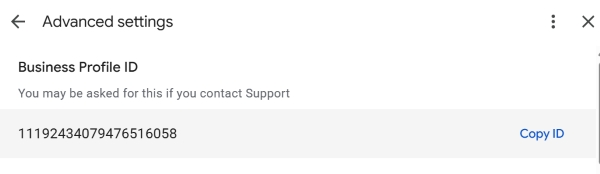
- Business Profile ID. This is the unique numerical identifier assigned to your listing. To find it, open your business profile management panel in Google Search → click the three dots in the upper-right corner → Business Profile settings → Advanced settings. Copy the numerical ID.
- The exact business name and address as they appear in your profile.
- Verification photos - photos of your building's exterior signage, street address plaque, and entrance.
- Legal documents - a scanned lease agreement or proof of property ownership, along with a business registration certificate or extract for your company or sole proprietorship.
How to Open a Google Support Ticket
Step 1. Open the Official Contact Form
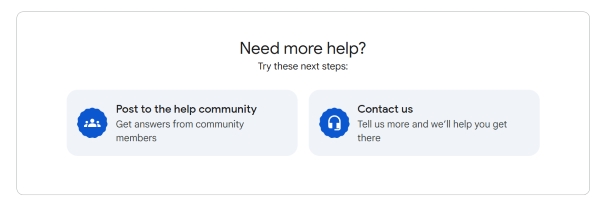
Visit support.google.com/business/gethelp (make sure you are signed in to the Google account that manages the business profile). At the bottom of the page, click Need more help?.
Step 2. Select Your Business and Specify the Issue
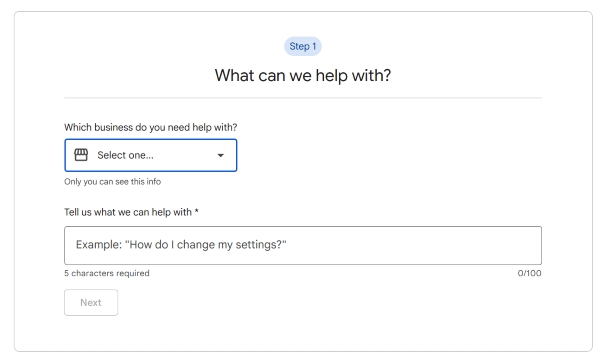
- Select the business listing experiencing the issue from the dropdown menu.
- In the "What is your issue?" field, briefly describe the problem, for example, profile suspension or verification error.
- Click Next and select the most relevant category from the available options.
Step 3. Skip the Automated Help Articles
Google will suggest existing help articles. Click Next step to proceed to the form for submitting a message directly to support.
Step 4. Complete the Form and Attach Files
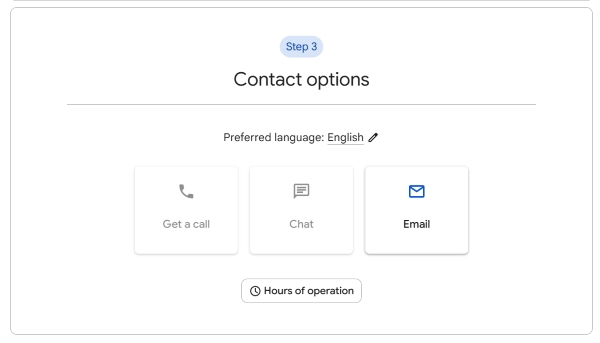
Select a contact method (the Email option is usually available). Complete all fields, describe the situation in detail, and upload an archive or individual files containing your documents and photos of your business signage.
Contact Options for Google Ads Advertisers
If your issue concerns paid advertising on Google Maps or advertising charges, you should contact Google Ads support directly rather than using the Google Maps Help Center. Response times from the advertising support team may be faster -
| Contact Method | Where to Find It | Response Time | Issues Covered |
|---|---|---|---|
| Google Business Profile support form | support.google.com/business/gethelp | 24–72 hours | Profile suspensions, verification, video verification, review removal |
| Google Ads live chat | Inside your Google Ads account - click the Help icon (?) | 5–15 minutes (during business hours) | Google Maps advertising issues, payments, disapproved ads |
| Dedicated appeals tool | Business Profile Appeals Tool in the GBP Help Center | 3–7 business days | Formal appeals against profile suspensions |
Important - After submitting your first support ticket, you will receive an automated email with a subject line similar to
[X-XXXXXXXXXXXXX] Your Google Support Inquiry. Do not create duplicate requests through the website! Doing so may put you at the back of the queue. Reply to all support questions directly to this original email, keeping the case number in the subject line.Support Request Template
Hello Google Business Profile Support Team!

I am requesting assistance with an issue affecting our business profile.
- Business name: [Exact name as shown in the profile]
- Address: [Full physical address]
- Business Profile ID: [Your numerical ID from the settings]
- Website: [Link to your website]

Issue description:
[Briefly describe the situation, for example: Our business profile was verified, but after we updated the opening hours, its status changed to "Suspended".
Our business operates at the specified address, the signage is displayed on the building's exterior, and we have not violated any policies.]

I have attached the following supporting documents:
1. A scanned copy of the lease agreement for the specified address.
2. The official business registration certificate.
3. Photos of the exterior business signage, building entrance, and interior workspace.

Please conduct a manual review of our profile and reinstate our business listing on Google Maps.
Thank you in advance!
Frequently Asked Questions
Does Google Business Profile support have a direct phone number or live chat?
Google Business Profile, as a free service, does not have a dedicated inbound telephone support line. Contact is handled primarily through the ticketing system and email. Advertisers with active Google Ads campaigns may have access to live chat or a callback option during business hours through their Google Ads account.
How long does Google support take to review a ticket?
An automated response containing your case number (Case ID) usually arrives within a few minutes. A response from a support specialist typically takes 24–72 hours. Complex appeals against profile suspensions may take up to 5–10 business days.
- The main official way to contact Google Maps support is through the ticket form at
support.google.com/business/gethelp. - Always include your numerical Business Profile ID and attach photos of your business signage and lease agreement in your first message.
- Keep all correspondence in a single email thread to avoid disrupting the support queue for your request.
Has Google support rejected your appeal or sent you a generic response?
Describe the issue and the reason for the rejection in the comments. We'll help you identify which documents the reviewers may have been missing and how to prepare a follow-up request.