
Which Photos Should You Add to Google Maps?
According to official Google data, business profiles with high-quality photos receive 42% more requests for directions and 35% more website clicks. Uploading just a logo is not enough. To achieve consistent conversions, your profile needs exterior photos showing the sign, interior shots, work areas, photos of your team at work, and product displays. All images should be authentic, without watermarks or promotional banners.
When someone searches for a clinic, restaurant, or auto repair shop on Google Maps using a smartphone, they often make a decision within 3–4 seconds. After the rating, the first thing that catches their eye is the photo gallery. If they see dark, blurry images or generic stock photos instead of real pictures of the business, they may close the listing immediately and choose a competitor nearby.
Google's computer vision algorithms analyze every uploaded image. The system identifies objects in the frame, evaluates lighting conditions, and can even detect excessive text overlays.
Google's Technical Requirements for Photos and Videos
| Parameter | Google's Requirements | Recommended Specifications |
|---|---|---|
| File format | JPG or PNG | JPG (for faster loading on smartphones) |
| File size | 10 KB to 5 MB | 1–3 MB |
| Resolution | At least 720 × 720 px | 1200 × 900 px (or 1920 × 1080 px) |
| Logo | Square format (1:1), at least 250 × 250 px | 720 × 720 px on a clean background |
| Cover photo | Landscape format (16:9 aspect ratio) | 1024 × 576 px (the most eye-catching photo of your business) |
| Videos | Up to 30 seconds, maximum 75 MB, at least 720p | 1080p, 15–20 seconds (a walkthrough from the street into the premises) |
Essential Photo Categories for Your Business Profile
Google organizes photo content into different categories. To make your business profile look complete, aim to cover all five of the following areas:
1. Exterior and Entrance (at least 3–4 photos)
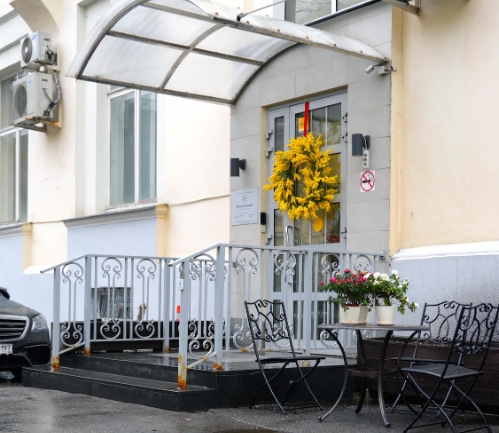
Goal - help customers find your building quickly, whether they are arriving by car or on foot.
- Full view of the building from the street - take a photo from the road or a nearby intersection, including recognizable landmarks in the surrounding area.
- Close-up of the facade and business sign - make sure the business name on the sign is clearly visible. Include the opening-hours sign displayed near the entrance.
- Parking and access - show the driveway, entrance to the courtyard, gate, or parking spaces available to visitors.
2. Interior and Atmosphere (at least 5–6 photos)
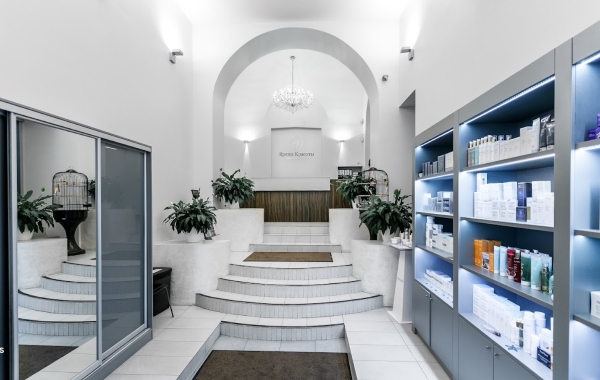
Goal - put first-time visitors at ease and showcase the cleanliness and comfort of your premises.
- Reception area or visitor check-in desk.
- Waiting area (sofas, water cooler, children's corner, coffee tables).
- Main halls, specialist offices, treatment rooms, or workstations.
- Accessibility features (ramp, wide doorway, wheelchair-accessible elevator).
3. Work Process and Services in Action (3–5 photos)
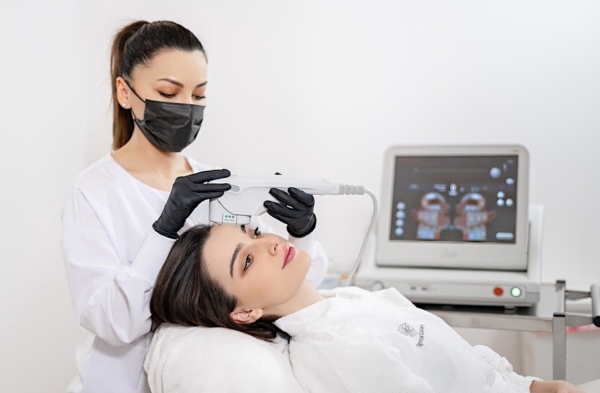
Goal - demonstrate professionalism and the quality of your equipment.
- Staff wearing clean, branded uniforms while working (a doctor consulting a patient, a chef in the kitchen, or a mechanic working on a vehicle lift).
- Close-up shots of modern equipment and professional materials used in your work.
- Before-and-after photos (for car detailing, cleaning services, or cosmetology).
4. Your Business Team (2–3 photos)

Goal - give your brand a human face and build personal trust.
- A friendly group photo of your team inside your business premises.
- Portraits of key specialists or business founders.
5. Product Displays and Food (for Retail and Food Businesses)
- Appetizing food presentation photographed in natural daylight.
- Neat product displays on shelves and in showcases, without distracting visual clutter.
What You Should Never Upload to Google Maps
Important - Violating Google's content policies may result in photos being rejected and marked as "Not approved." Repeated violations can also lead to further restrictions on your content or business profile.
- Stock photos from image libraries. Google may identify generic or reused images and restrict their display. Use authentic photos of your actual business instead.
- Promotional banners and flyers. Avoid adding large promotional text, arrows, discount labels ("50% Off!"), price tags, or phone numbers over your photos. Natural branding, such as a logo on a uniform or business sign, is acceptable.
- Screenshots and collages. Do not upload screenshots of WhatsApp conversations, website screenshots, or complex collages made up of four small images.
- Extreme filters. Excessive color correction that distorts the actual appearance of your premises can mislead customers and may result in complaints or content removal.
How to Add Photos to Your Profile in 1 Minute
- Sign in to the Google account used to manage your business.
- Search Google for the phrase
my business. - In the management panel, click Add photo.
- Choose the type of image - Photo, Logo, or Cover photo.
- Drag your prepared files into the browser window and click "Upload."
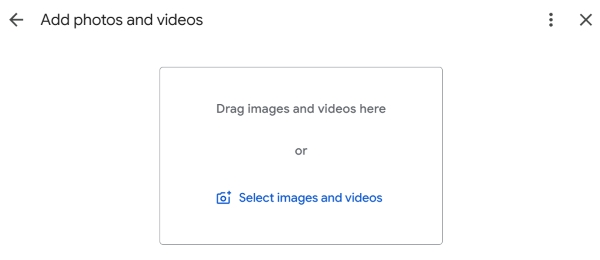
Photos may appear on your business profile after Google's automated review. Processing times vary, and publication is not guaranteed immediately.
Checklist: Audit Your Business Profile's Visual Content
Frequently Asked Questions
Why was my photo rejected by Google Maps moderation?
Google may reject images that violate its content policies, including blurry photos, watermarked images, duplicates, and images with excessive promotional overlays. Stock images and photos containing phone numbers may also be restricted depending on their content and context.
Can I choose a specific cover photo for my Google Maps business profile?
In Google Business Profile, you can upload and designate your preferred cover photo. However, Google determines which image is ultimately displayed. The system may show another photo of your business if it considers that image more relevant to the user.
- Photos are an important factor in attracting clicks (CTR) when customers compare businesses in the same area.
- Focus on helping customers find you - a clear view of the facade, a visible business sign, and recognizable landmarks can help visitors reach your entrance without unnecessary phone calls.
- Update your visual content regularly - add 3–5 new, authentic photos each month to keep your profile fresh and informative.
Not sure which photos would work best as a cover image for your type of business?
Tell us your industry in the comments, and we'll suggest effective camera angles and photo ideas to help attract more calls and visits.