
Google Business Profile Insights - How to Read Reports and Identify Growth Opportunities on Google Maps
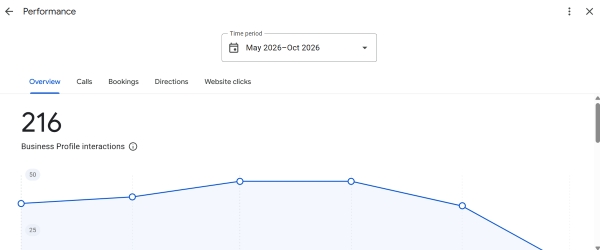
All Google Maps business profile statistics are collected in the Performance section. The report shows three main categories of data for the past 6 months - how many people saw your business in Search or Maps, which keywords they used to find you, and how many users took a desired action - called your business, requested directions, or visited your website.
Promoting a business on Google Maps without tracking the numbers is impossible. Without data, you cannot tell whether changing your primary category, uploading new interior photos, or working on reviews has produced results.
Google Business Profile analytics helps you distinguish genuine customer interest from simple impressions. Let's look at where to find the statistics, what each chart means, and what conclusions business owners should draw from the data.
How to Access Your Business Profile Insights
- Sign in to Google using the account that manages your business profile.
- Search Google for your business name or enter
my business. - In the management panel, click the Performance icon.
- At the top of the window, select the desired date range (data for the past 6 months is available) and click Apply.
Understanding the Metrics - What Google Measures
The analytics interface is divided into an overview tab with summary interaction data and detailed tabs for different types of actions.
| Report Metric | What the System Measures | What the Trend Indicates |
|---|---|---|
| Profile views (Views) | The number of unique users who viewed your profile each day, broken down by Search/Maps and desktop/mobile devices. | Reflects your business's overall visibility in the local area and seasonal demand in your industry. |
| Search queries (Searches) | The exact words and phrases that caused your profile to appear in search results. | Shows the balance between branded traffic (people searching for your business by name) and category-based traffic (people searching for a service). |
| Interactions (Interactions) | The total number of active clicks on elements of your business profile. | A key indicator of how appealing your profile is compared with nearby competitors. |
| Calls (Calls) | Clicks on the phone button from mobile devices. | A direct source of high-intent inquiries for your sales team or reception desk. |
| Direction requests (Directions) | Unique requests for directions to your business location. | A key metric for physical locations such as cafes, shops, car washes, and shopping centers. |
| Website clicks | Visits to your domain from the main website link on your business profile. | Indicates audience interest in detailed pricing, portfolios, and terms of service. |
Important - Google filters statistics to prevent artificial inflation. If the same person opens your profile five times and requests directions three times in one day, the system may count only one view and one direction request.
Where to Find Growth Opportunities - 3 Practical Scenarios
1. Analyze the Pie Chart for Devices and Platforms
In the People who viewed your profile section, check the distribution across platforms:
- Google Maps on mobile devices accounts for more than 60% - your audience is looking for services while on the go or nearby. Focus your profile on photos of the building's exterior, a clearly visible sign, parking information, and quick access by phone.
- Google Search on desktop computers predominates - customers take their time choosing a provider. This is common for clinics, lawyers, B2B companies, and home renovation businesses. Detailed reviews, a complete price list, and a product or service showcase are especially important.
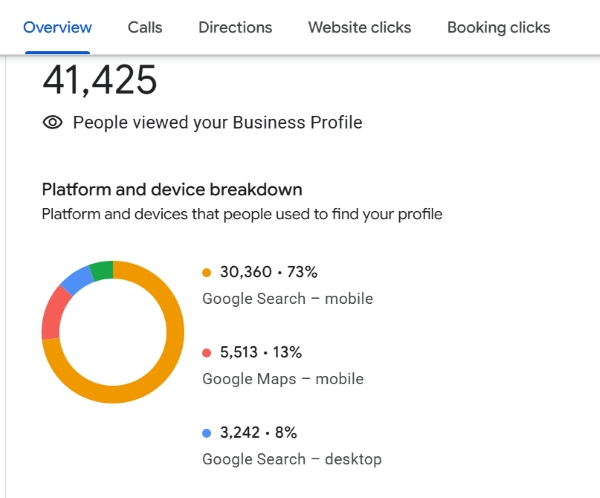
[Screenshot placeholder - Chart showing views by Search/Maps platforms and device types]
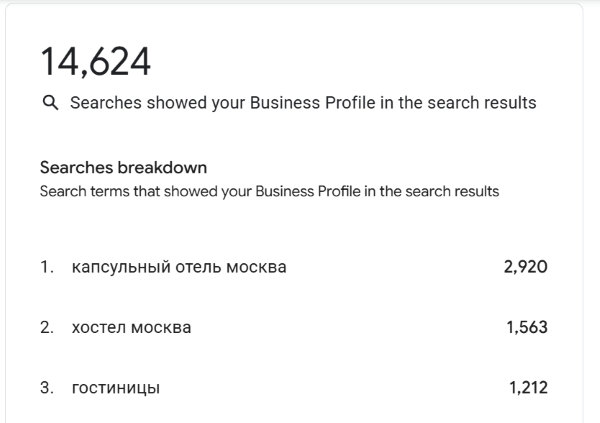
2. Analyze the "Search Queries" Report
Scroll down to the list of keywords below the views chart. Evaluate the types of search phrases you see -
- If your business name is the only phrase at the top, your profile is not attracting new customers; mostly people who already know your business are finding it. Review your categories and add more information to the "Services" section.
- If you see searches for specific services that you offer but haven't featured in your showcase yet, add them to the "Products" section as soon as possible and encourage customers to mention those services in their reviews.
3. Diagnose Drop-Offs in the Conversion Funnel
- Many impressions but few interactions - your profile is losing out visually to competitors in the Local Pack (the top 3 local results). Check your rating (ideally 4.5 or higher), profile cover photo, and review count compared with nearby competitors.
- Many website clicks but few calls - check where the link leads. The page may load slowly on smartphones, or your prices may not be easy to find.
Checklist - Monthly Analytics Audit
Frequently Asked Questions
Why is there a delay before data appears in the "Search Queries" report?
Unlike call and website click data, the list of search phrases is updated once a month, usually in the first few days of the following month. Google also hides rare, low-volume search queries to protect user privacy.
How can I export Google Business Profile statistics to an Excel spreadsheet?
You can export a report in CSV format through the table interface in Business Profile Manager (business.google.com/locations). Select the required locations using the checkboxes, click Actions, and choose the option to download the performance report.
Tips
- The "Performance" report stores data for only 6 months. Download summary tables regularly to track seasonal trends throughout the year.
- Use the search queries report as a free source of real customer search terms to improve your price list and website content.
- Don't focus on views alone. Track trends in valuable actions, including calls, direction requests, and website visits.
Noticed a sudden drop in impressions or calls in your statistics?
Leave a comment with your industry and the metrics that have declined. We'll help you identify the cause and recover your traffic.