
| Method | Cost | Complexity | Speed of Implementation | Key Risks & Considerations |
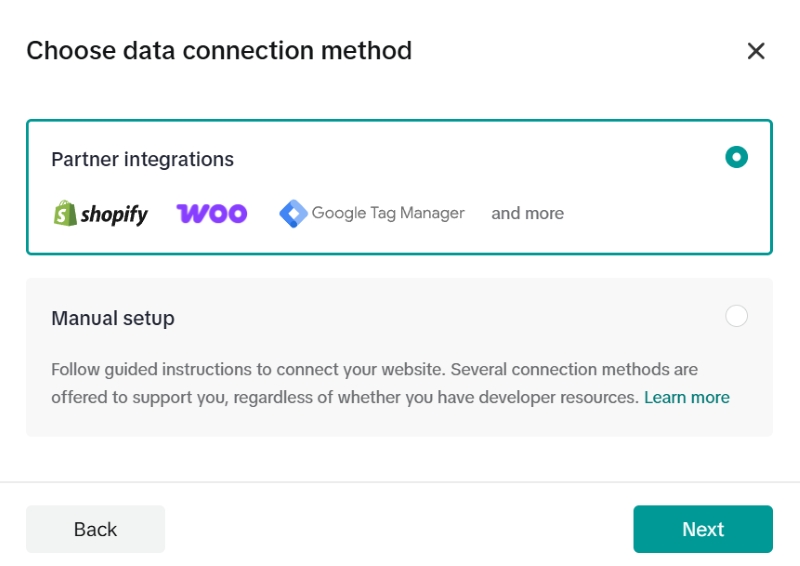
| Partner Integrations (e.g., Shopify, Google Tag Manager) | Low (often included in platform subscriptions) | Low to Medium | Fast | Limited customization, potential for data discrepancies between platforms. |
| Manual Setup (Event Builder - No Code) | Low (requires time investment) | Low | Fast | Can be restrictive for complex actions, may not capture all desired parameters. |
| Manual Setup (Custom Code) | Medium (may require developer resources) | High | Slow | Highly flexible and accurate, but prone to human error and requires ongoing maintenance. |
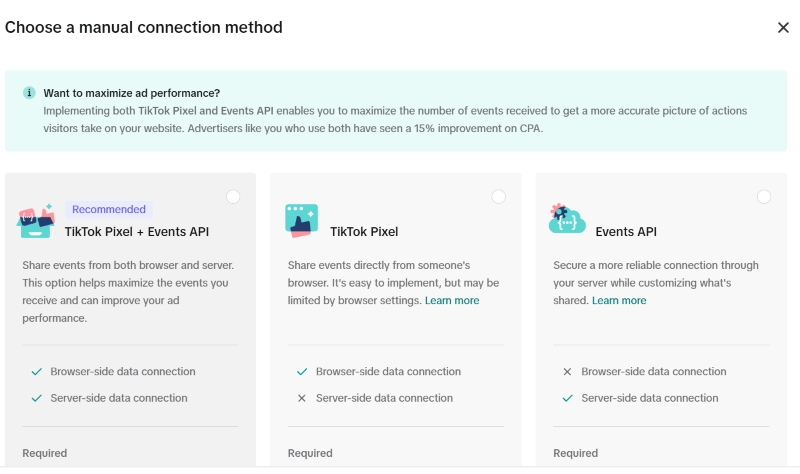
| Events API (Server-Side Tracking) | Medium to High (requires developer expertise and server resources) | High | Slow | Most reliable against signal loss (ad blockers, iOS 14+), but complex to implement and debug. |
Detailed Breakdown of Event Setup Methods
1. Partner Integrations. The Plug-and-Play Approach
Partner integrations, especially with platforms like Shopify and Google Tag Manager (GTM), offer a streamlined way to deploy standard e-commerce and lead generation events.
-
Best For. E-commerce businesses on supported platforms, marketers looking for a quick and reliable setup for standard funnel events.
-
Step-by-Step (Shopify Example).
-
Install the official TikTok app from the Shopify App Store.
-
Connect your TikTok For Business account.
-
Select your Pixel and enable data sharing. The app will automatically sync key events like View Content, Add to Cart, Initiate Checkout, and Complete Payment.
-
-
Pro-Tip. While convenient, always verify the data being passed. Use the TikTok Pixel Helper Chrome extension to ensure event names and parameters match your expectations.
2. Manual Setup with Event Builder. The Visual Approach
TikTok's Event Builder is a point-and-click tool that allows you to create events without writing code. You can define events based on URL visits or button clicks.
-
Best For. Tracking conversions on landing pages, lead form submissions, or specific button interactions without developer assistance.
-
Step-by-Step.
-
In TikTok Events Manager, select your Pixel and choose "Event Builder" as your setup method.
-
Enter your website URL to launch the tool.
-
To track a button click (e.g., "Submit Form"), select "Add Event," choose "Button Clicks," and visually select the button on your site.
-
Assign a standard event type like Submit Form or Contact.
-
To track a thank-you page visit, use the "URL Visits" option and specify a keyword from the URL (e.g., "thank-you").
-
-
Pro-Tip. Be mindful of dynamic URLs and button classes. If your website's structure changes, you may need to update your Event Builder rules.
3. Manual Setup with Custom Code. The Precision Approach
For ultimate control, you can add custom JavaScript snippets to your website to fire events. This method is ideal for tracking non-standard interactions or passing rich, custom parameters.
-
Best For. Businesses with unique conversion funnels, tracking specific user interactions, and enriching events with detailed parameters like product SKUs, categories, or lead quality scores.
-
Real-World Example (Lead Generation). A B2B company wants to track not just a form submission, but the specific service the user was interested in.
JavaScript<script> // On successful form submission ttq.track('SubmitForm', { content_type. 'service', content_name. 'Enterprise SEO Consultation', value. 5000, // Estimated value of the lead currency. 'USD' }); </script> -
Pro-Tip. Always use standard event names when possible (CompletePayment, AddToCart, SubmitForm). This allows TikTok's algorithm to better understand the action and optimize for it. Use custom parameters to add the specific details you need.
4. The Events API. The Fort Knox of Tracking
The Events API allows you to send data directly from your server to TikTok's. This circumvents client-side issues like ad blockers and browser restrictions, providing a more robust and reliable data stream.
-
Best For. E-commerce at scale, businesses heavily impacted by iOS 14+ privacy changes, and any marketer seeking the highest level of data accuracy.
-
Step-by-Step Overview.
-
In Events Manager, select your Pixel and navigate to the "Settings" tab.
-
Under "Events API," click "Generate Access Token."
-
Work with your development team to send server events (e.g., a purchase confirmation from your backend) via HTTP POST requests to TikTok's API endpoint.
-
Crucially, implement deduplication. You must pass the same event_id for both the browser-side pixel event and the server-side API event to prevent double-counting.
-
-
Pro-Tip. Start by implementing the Events API for your most critical conversion event, typically CompletePayment or CompleteRegistration. This ensures your most valuable data is protected from signal loss.
Legal, Technical, and Organizational Nuances
-
Legal Compliance (GDPR/CCPA). You must obtain explicit user consent before the TikTok Pixel fires. Implement a Consent Management Platform (CMP) to manage user opt-ins and opt-outs. Your privacy policy must clearly state that you use the TikTok Pixel and for what purposes.
-
Technical Pitfalls.
-
Duplicate Events. This common error inflates conversion numbers. It often occurs when an event is tracked both via an automated rule (like in GTM) and a manual code snippet on the same button.
-
Incorrect Parameters. Ensure value is passed as a number and currency is in the correct ISO format (e.g., 'USD'). Mismatched product IDs between your catalog and your pixel events can cripple Dynamic Product Ads.
-
Content Security Policy (CSP). If your website has a strict CSP, you may need to whitelist TikTok's domains to allow the pixel script to load.
-
-
Organizational Best Practices. Maintain a "tracking plan" document. This should outline every event you track, its trigger, the parameters it includes, and its business purpose. This is invaluable for onboarding new team members and for debugging.
Practical Tips and Lifesavers
-
Save Time with the Pixel Helper. The TikTok Pixel Helper Chrome Extension is your first line of defense. It helps you instantly verify if your pixel is active and which events are firing on any given page.
-
Use the "Test Events" Tool. Within the Events Manager, the "Test Events" feature allows you to see event activity in real-time as you navigate your site. This is essential for debugging before launching a campaign.
-
Prioritize Full-Funnel Tracking. Don't just track the final conversion. Tracking events like ViewContent, AddToCart, and InitiateCheckout provides crucial data for building retargeting audiences and identifying drop-off points in your funnel.
Frequently Asked Questions (FAQ)
What's the difference between a Standard Event and a Custom Event?
Standard Events are predefined actions that TikTok recognizes, such as AddToCart or CompletePayment. Using them is highly recommended as it helps TikTok's system optimize your ad delivery. Custom Events are actions you define yourself. They are best used for tracking important business-specific actions that don't fit into a standard category, but they offer limited optimization capabilities.
Why are my events not showing up in the Events Manager?
This could be due to several reasons. 1) The pixel base code is not installed correctly on every page. 2) An ad blocker is preventing the pixel from firing. 3) A Content Security Policy on your site is blocking the script. 4) The event code itself contains a syntax error. Use the TikTok Pixel Helper and the "Test Events" tool to diagnose the issue.
Should I use the TikTok Pixel and the Events API together?
Yes, this is TikTok's recommended best practice. Using both provides the most comprehensive and reliable data. The Pixel captures browser-side events, while the Events API captures server-side events, acting as a backup against signal loss from ad blockers and browser privacy settings. Remember to implement deduplication to avoid counting conversions twice.
A meticulously implemented TikTok Pixel event strategy is the bedrock of successful advertising on the platform. By moving beyond a simple setup to a full-funnel, multi-layered approach that includes the Events API, you are not just collecting data—you are building a resilient, intelligent system. This system will empower you to create highly effective custom audiences, accurately measure your return on ad spend, and allow TikTok's algorithm to find your next best customers with unparalleled precision. Invest the time in a robust setup today to reap the rewards in performance tomorrow.