
Posts on Google Maps
How to Create Google Updates Posts to Increase Reach and Sales
The Add update section (Google Updates) is a free news feed for your business listing that appears directly in Google Search and Maps. Regular posts signal to search algorithms that your business is active and growing, while showing users current promotions and new products or services. Publish one post every 7–10 days, use high-quality landscape photos (4:3 aspect ratio), and always add action buttons with UTM-tagged links.
Many companies treat their Google Business Profile as a static business card: they enter an address, add a phone number, and forget about it. But when potential customers browse competitors' profiles, the business that looks modern and approachable stands out. A fresh post featuring this week's promotion or a photo of a recently completed job immediately builds trust.
Google's search crawler also scans the text of your posts. By including popular local search queries and service names, you can expand your profile's reach and increase its chances of appearing in the Local Pack (the top 3 local search results). Let's explore post formats, formatting guidelines, and common moderation issues.
3 Types of Posts in Google Business Profile
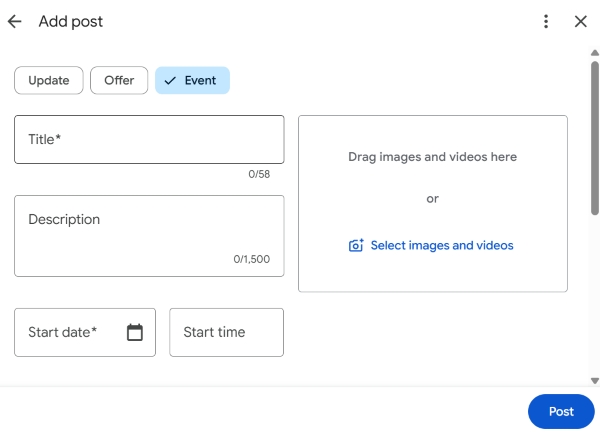
When you click the Add update button, the system lets you choose one of three post types. Each serves a different business purpose:
| Post type | Best use cases | Display duration | Key elements |
|---|---|---|---|
| 1. Add update (What's new) | Case studies, news, new product arrivals, daily operations, expert tips | Active for 7–14 days, then moves into the archive feed | Photo, text up to 1,500 characters, call-to-action button (CTA) |
| 2. Add offer (Deals and discounts) | Special offers, seasonal sales, promo codes for new customers | Displayed prominently for the specified dates | Benefit-focused headline, start/end dates, promo code, offer terms |
| 3. Add event (Events) | Open days, workshops, customer appreciation days, tastings | Until the event's end date and time | Event name, exact schedule, registration link |
Anatomy of a High-Converting Google Maps Post
To make sure your post generates real inquiries rather than just empty views, follow this proven structure:
1. A Strong Visual
Posts on smartphones are highly visual. Use landscape images with a 4:3 or 16:9 aspect ratio (minimum resolution: 1200 × 900 px). The image should show a real result: a repaired car, a finished dish, or a consultation in progress. Avoid blank white margins around the edges.
2. The First 100 Characters
Users see only the first two or three lines in the preview. Put the main message and benefit right at the beginning. Avoid generic openings such as "We're pleased to announce...". Get straight to the point: "From May 15 to 30, get a comprehensive suspension inspection free with an oil change. Book in just 1 minute using the button below."
3. Useful Context and Keywords
Use the main body to describe the details: which materials are used, how long the procedure takes, and what guarantees are provided. Naturally incorporate the names of your actual services to help optimize your business listing for search.
4. A Call-to-Action Button
Google allows you to attach an interactive button to a post:
- Book or Order online - for booking an appointment with a specialist or reserving a table.
- Learn more - directs users to a dedicated landing page on your website.
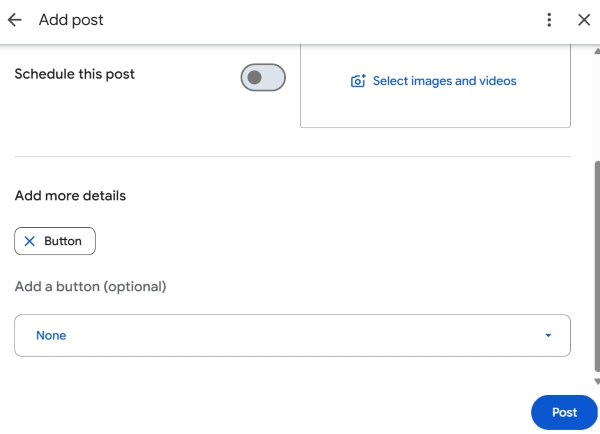
Important - Always add UTM parameters to links used in the "Learn more" or "Buy" buttons. For example:
?utm_source=google_maps&utm_medium=organic&utm_campaign=post_spring2026. This is the only way to see in Google Analytics 4 how many actual purchases or inquiries a specific post generated.Why Google Rejects Posts
Sometimes, after you click "Publish," a red "Rejected" label appears next to your post. Here are the most common reasons why content gets blocked:
- Phone numbers or links in the post text. Google prohibits phone numbers, website addresses, and email addresses in the post description field because its algorithms may classify them as spam. Contact details should be provided exclusively through the built-in action buttons.
- Text overlaid on photos. If an advertising banner is placed over an image and the text covers more than 20% of the image area, Google's computer vision algorithm may reject it. Photos should look natural.
- Aggressive style (all caps and excessive exclamation marks). Headlines such as "SHOCKING! TODAY ONLY, 90% OFF!!!!!" are automatically blocked by spam filters.
- Prohibited topics. Posts about tobacco products, vaping products, alcohol, prescription medications, or gambling may be blocked under Google's content policies.
What Local Businesses Should Post About
To avoid running out of ideas, rotate between these four proven post formats (one post per week):
- Week 1 (Before-and-after case study) - showcase completed work. A photo of the problem → a photo of the finished result → a brief explanation of how long the work took.
- Week 2 (Special offer of the week) - offer a discount on a specific service that receives fewer bookings on weekdays, or provide a bonus for first-time customers using a promo code.
- Week 3 (Meet the specialist) - share a high-quality photo of a technician or doctor at work, along with their experience, qualifications, and a link to book an appointment.
- Week 4 (Answer a frequently asked question) - address a common customer concern (for example, "How do you prepare a car for the new season?" or "Does getting a tooth treated under a microscope hurt?") and provide expert advice.
Checklist - Publishing an Effective Google Maps Post
Frequently Asked Questions
How many days does a post remain in the active area of a Google Maps listing?
A standard "What's new" post may remain prominently displayed on the listing's main screen for 7–14 days, after which it moves further down the feed as new posts appear. "Offer" and "Event" posts remain visible until their specified end dates.
Does post text directly affect a business's SEO rankings in Google Maps?
Yes. Google's search algorithms index key phrases from Google Updates posts. If you regularly publish content about specific services (for example, "car body polishing" or "pediatric dentistry"), your listing may appear more often for related searches as it builds a broader range of relevant terms associated with your business.
- Google Updates posts are a free tool that transforms an inactive map listing into a dynamic showcase of business news.
- Alternate post formats: use "Offers" with promo codes to drive direct sales and "Updates" to demonstrate your expertise and showcase case studies.
- Follow the technical guidelines: keep links out of the description text and use clean photos without advertising overlays.
Want to create a high-converting content plan for your Google Maps posts?
Tell us about your industry in the comments, and we'll suggest five ready-to-use post ideas designed to attract calls from potential customers in your niche.